

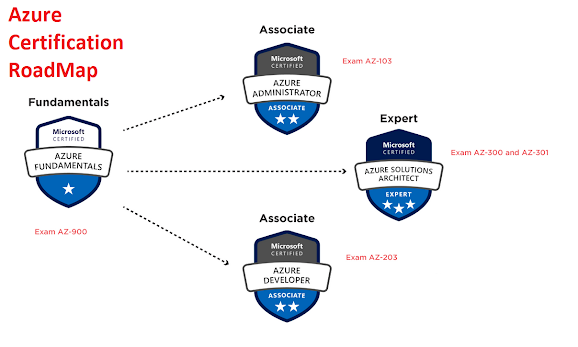
This course will give you the essential knowledge required to become a subject matter expertise in implementing, managing, and monitoring an organization’s Microsoft Azure environment. Responsibilities for an Azure Administrator include implementing, managing, and monitoring identity, governance, storage, compute, and virtual networks in a cloud environment, plus provision, size, monitor, and adjust resources, when needed. An Azure Administrator often serves as part of a larger team dedicated to implementing your organization's cloud infrastructure. Through this course you shall also gain the knowledge to take Microsoft Azure Administrator: AZ-103/AZ-104, Microsoft Azure Architect Technologies: AZ-300/AZ-303.
The Learners will gain strong knowledge on:
Cloud Computing Introduction:- Azure global infrastructure
- Azure Account and Subscription
- Create Azure Account and Subscription
- Create Azure Account and Subscription-English
- Core Services of Azure IaaS
Implement virtual networking:- Azure Networking Services Overview
- Connectivity services-Part1
- Create VNet
- Connectivity services Part-2
- Application Protection Services
- Create Network Security Group
- Application Delivery Services
- Network Monitoring services
Implement storage accounts:- Storage Account Overview
- Create Storage Account
Implement VMs for Windows and Linux:- Azure Virtual Machines
- Virtual Machine series
- Create Windows Virtual Machine
- Connect and Explore Windows Virtual Machine
- Configure Windows Virtual Machine as a Webserver
- Create Linux Virtual Machine
- Connect and Explore Linux Virtual Machine
- Configure Linux Virtual Machine as Webserver
- Delete Resource Group
- Configure Static IP for VM
- Changing Size of VM
- Reset Windows VM Admin Password
- Reset Remote Desktop Setting of Windows VM
- Working on Serial Console of Windows VM
Automate deployment and configuration of resources:- Azure PowerShell
- Create Windows VM Azure PowerShell
- Azure Resource Manager
- Create-Download ARM Template
- Edit ARM Template
- Deploy Resources Using ARM Template
- Deploy Linux VM Using ARM Template
Implement cloud infrastructure monitoring:- Configure Diagnostic Settings on Azure Resources
- Create Alerts
- Create Alert Rule Action
- Create Metrics
- Log Analytics Workspace
Implement storage accounts - Part2:- Azure Blob Storage
- Create Containers in Storage Account
- Add Data Disk to VM
- Detach Data Disk from VM
- Add Data Disk to VM with Managed-Disk
- Upload On-Premises VHD to Azure Storage Account
- Create File Shares
- Connect/Access File Shares
- Configure Shared Access Signature
- Access Storage Account Using Storage Explorer
- Azure AD Authentication for Storage
- Log Analytics for Storage
Implement virtual networking - Part2:- Route Table
- Create Route Table
- Add Route to Route Table
- Associate Route Table to a Subnet
- Configure IP Forwarding in NVA
- Test Routing
- Application Security Group
- Virtual Network Peering
- Create Virtual Network Peering
- Create Global Virtual Network Peering
- Create VNet-to-VNet Connectivity Using Virtual Network Gateway - Part1
- Create VNet-to-VNet Connectivity Using Virtual Network Gateway – Part2
- Implement Azure Active Directory
- Azure Active Directory Overview
- Create Custom Domain in Azure Active Directory
- Create Users and Groups in Azure Active Directory
- Login as Azure AD user in Azure User Access Panel Portal
- Configure Enterprise Applications For Azure AD User
- Multi-Factor Authentication
- Configure Multifactor Authentication
- Configure Azure Multi-Factor Authentication settings
- Configure Azure AD Premium License
- Configure Self-Service Password Reset (SSPR)
- Azure Active Directory Identity Protection
- Azure Active Directory Identity Protection - Security overview
- Azure Active Directory Identity Protection - Demo
- Azure AD Conditional Access policies
- Azure AD Conditional Access policies - Demo
- Azure Active Directory (Azure AD) Identity Governance
- Manage guest access with Azure AD access reviews
- Azure AD Identity Governance - Review Access - Demo
- Install and Configure Azure AD Connect-Demo
- Configure and Manage Password Sync and Password Writeback
- Azure AD Connect Health
Azure Backup and Restore:- Azure Backup Service
- Cerate Recovery Service Vault
- Configure Backup for Azure Workloads
- Configure Backup for Azure File Shares
- Configure Backup for On-Premises Workloads
- Install and Register MARS Agent on On-Premises Workload
- Backup and Restore On-Premises Workload using MARS Agent
- Implement an Azure Application Infrastructure:
- Azure App Service
- Create Azure App Service
- Configure FTP Deployment User And Upload App Service Content
- Configure Custom Domain Name for App Service
- Configure Scaling for App Service
- Configure Deployment Slots for App Service
Performance by Course Attribute4.30
Are you Learning Valuable Information
Are the Explanation of Concept clear
Is the instructor's delivery engaging
Are there enough opportunites to learning
Is the Course delivering of Your Expectation
In the instructor Knowledge of Topic
Leave a Comment